Meta Pixel in 2026: The Setup and Audit Guide | Affect Group
Same Pixel, Different Rules
Shopify says 47 orders today. Ads Manager says 22. CPA jumps around day to day, with no sign of learning or a stable run. Traffic from Facebook and Instagram converts worse than it used to.
It's not a bug in your account. The rules around the pixel changed four times in the last year, and nothing in the Ads Manager interface tells you so:
- September 15, 2025 — iOS 26 and Safari 26 turned on Advanced Fingerprinting Protection by default and stripped click IDs from traffic coming out of Mail and Messages.
- January 12, 2026 — Meta retired the 7-day-view and 28-day-view attribution windows. If you hadn't touched your settings, reported conversions dropped 15–40% overnight.
- January 13, 2026 — Shopify flipped its app-pixel data-sharing from "Always on" to "Optimized" by default. Pixels that send few events now carry less weight in optimization: the data still reaches Meta, but the algorithm weighs it less in training — so optimization gets worse, or doesn't kick in at all.
- April 15, 2026 — Meta shipped one-click Conversions API and AI enrichment for the Pixel. And said it plainly: Pixel and CAPI need to run together, with deduplication.
Below: the step-by-step on fixing your tracking and giving Meta back enough data to optimize on.
A note on the name. Facebook Pixel was renamed Meta Pixel back in 2022. The code is the same. From here on, it's Meta Pixel.
What Meta Pixel Is and Why "Facebook Pixel" Doesn't Fit in 2026
Not Just a Rename
Meta renamed Facebook Pixel to Meta Pixel back in 2022, after the company rebrand. The old name still gets thrown around in conversation, but in Events Manager, the documentation, and partner integrations, it's Meta Pixel everywhere. The JavaScript code itself is identical — nothing changed about how you install it.
The point isn't the name. The pixel stopped being a standalone tracking tool a long time ago. It's now one data source feeding Meta's optimization system. In 2019, the pixel was "the thing that counts conversions." In 2026, it's "the thing that feeds Andromeda and GEM."
What the Pixel Actually Does
Meta Pixel is a small piece of JavaScript you drop into the <head> of every page on your site. When the page loads, it pulls a library from Meta's servers and fires a base event — usually PageView. From there, as the visitor does things — views a product, adds to cart, pays, submits a lead form — additional events fire (ViewContent, AddToCart, Purchase, Lead, and so on), and the pixel pushes them to Meta's servers as plain HTTP requests.
Cookies travel with each event — primarily _fbp and _fbc. Meta uses these to tie the event to a specific user and their ad session. That data is the main fuel for Meta's algorithms: Andromeda at the retrieval stage (deciding which ads even qualify for the auction) and GEM at the ranking stage (picking which specific ad to show a specific person).
If the events are sparse or arrive in pieces, the algorithm has nothing to learn from, and optimization stalls.
The main thing to remember: the pixel is a data source, not the final answer. And that source can't carry the weight alone anymore. Why — next section.
How Meta Pixel Works and Where the Training Data Leaks
The Browser-Side Chain
When a user clicks an ad, Meta tacks an fbclid parameter onto the URL — that's the click identifier. The user lands on your site, and the following chain kicks off in the browser:
- The base pixel code loads — a JS library from the
connect.facebook.netdomain. - The pixel sets a 1st-party
_fbpcookie on your domain (a browser identifier). - The pixel grabs
fbclidfrom the URL and stores it in the_fbccookie (tying things back to that specific ad click). - For each event —
PageView,ViewContent,Purchase, and so on — the pixel sends an HTTP request to Meta's servers. The request carries the event name, parameters (currency, value, content_ids),_fbp,_fbc, user-agent, and IP (the last two come with the request automatically). - If Advanced Matching is on, hashed user data — email, phone, name, and so on — gets added too, if those values exist on the page.
- Meta receives the request and tries to match it against a user profile in its system.
Any link in this browser chain can break. In 2026, links break consistently.
Where 30–60% of Conversions Leak

Safari ITP (Intelligent Tracking Prevention). Safari automatically caps the lifetime of 1st-party cookies set via JavaScript at 7 days. _fbp disappears before the user is ready to close the deal. On long sales cycles — B2B, premium niches, leads that need nurturing — this matters: attribution to the ad campaign gets lost for no obvious reason.
iOS 26 and Advanced Fingerprinting Protection. Since September 15, 2025, this protection is on by default in Safari on iOS 26. Among other things, it strips click IDs from links the user opens in Mail and Messages. If your remarketing runs through email or your partner links travel through messengers, some of your traffic comes in without fbclid, and the click attribution doesn't get built.
Ad blockers. 25–30% of web users run an ad blocker. Most of them block the connect.facebook.net domain outright. The pixel doesn't load — no events fire at all.
Facebook and Instagram in-app browsers. Their own in-app browsers execute JavaScript inconsistently and handle cookies poorly. Some events get lost; others come through without a full parameter set. The paradox: Meta loses data inside its own apps.
By industry estimates in 2026, running on the browser pixel alone loses anywhere from 30 to 60% of real conversions. That's the gap Conversions API is supposed to close. More on that next.
Meta Pixel and Conversions API: The 2026 Standard, Not an Upgrade
What Changed on April 15, 2026
That day, Meta released two connected updates. First: one-click Meta-enabled Conversions API. Before this, CAPI required either a developer to write server-side code or a paid partner integration through Shopify, WooCommerce, and similar. Now it's a button in Events Manager — no code, no separate server, no fee. Second: AI enrichment for the Pixel — Meta's algorithm now automatically pads events with product and page data (name, availability, price) that previously had to be coded in by hand.
The headline isn't the tools themselves; it's the framing Meta used. The official wording says it directly: every advertiser should run Pixel and Conversions API together, with deduplication.
So Pixel in 2026 isn't a standalone tool. It's half of a mandatory pair.
Where the 17.8% Lower CPA Comes From
Meta cites the number: advertisers running CAPI for web events see CPA that's on average 17.8% lower than those running Pixel-only.
It's not server-tracking magic. It's just a more complete picture. When the algorithm sees 60% of real conversions instead of 40%, it gets more accurate at predicting who to show ads to. Auction calls and budget allocation are better grounded.
The number is a portfolio average across Meta. Some advertisers see a smaller gap (e.g., when traffic is mostly Android Chrome without ad blockers); others see a bigger one (long cycles, B2B, predominantly iOS audiences). For most SMBs, a realistic baseline is 15–20% savings at the same budget and the same creative.
Deduplication via event_id
If Pixel and CAPI both fire the same purchase (Pixel from the browser, CAPI from your server), Meta needs to know it's one event. Otherwise the same purchase gets counted twice and the report lies to you.
The mechanic is straightforward. For each event leaving the browser, Pixel generates a unique identifier — event_id. The same event_id has to go into the event leaving via CAPI at the same moment. Meta sees the match and keeps one record.
Without deduplication, the pair has no point. It's the first thing you check after wiring up CAPI. If the setup was done through a quick integration with no developer involved, deduplication is where things break most often.

EMQ — The New "Working or Not" Metric
In Events Manager there's a metric called Event Match Quality (EMQ) — a score from 1 to 10. It shows how well Meta can match your event to a specific user in its system.
What raises EMQ: the count and quality of parameters traveling with each event:
- email (hashed)
- phone (hashed)
- first and last name
- IP address
- user-agent
_fbpand_fbccookiesexternal_id(your internal customer identifier)- click ID
More parameters and cleaner data, the higher the score.
Working benchmark: EMQ ≥ 7 across all key events. If you're at 4–5, the algorithm is optimizing on half a picture, and wiring up CAPI won't give you the lift it could. This is the first thing to look at when you need to know whether your Pixel + CAPI pair is alive or it's just "set it and forget it."
How to Set Up Meta Pixel and CAPI in 2026
Step by step. If there's no pixel at all, walk through all six steps. If there is one but it's running solo, jump to Step 4. Two hours of proper setup is cheaper than six months of optimizing campaigns on half the data.
Step 1. Create the Pixel in Events Manager
Go to business.facebook.com/events_manager. Click Connect Data Sources → Web → Meta Pixel, give the pixel a meaningful name (your brand name, not test_pixel_v2), and enter the site domain.
You'll get a Pixel ID — a long string of digits. Save it or copy it; you'll need it on every step that follows.
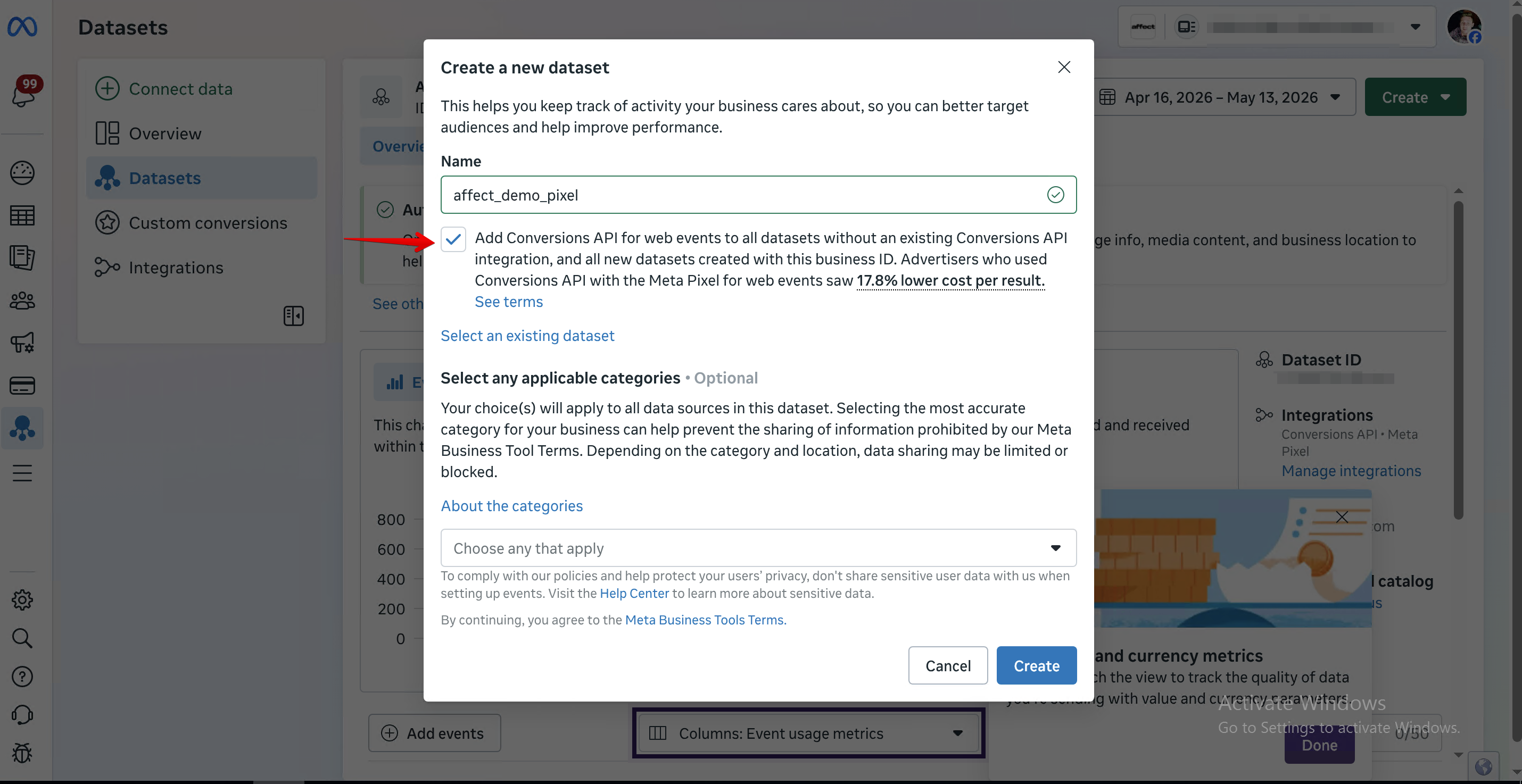
If you already have a pixel on this domain, don't create a second one. One site = one pixel. Multiple pixels in the code mean duplicate events, a mess in EMQ, and event_id conflicts during deduplication.
Step 2. Install the Base Code
Three options. Pick what fits what you've got:
- Through a built-in integration. Shopify, WooCommerce, Webflow, Tilda, WordPress, Wix — each has either a native Meta integration or an official app. Plug in the Pixel ID and the code lands on every page automatically.
- Through Google Tag Manager. Works if GTM is already on the site. Use the official Meta Pixel template from Community Templates; don't paste the pixel code into a Custom HTML tag — you'll lose features.
- Manually in
<head>. If your developer is touching the code directly. Meta hands you the base snippet in Events Manager right after the pixel is created. Drop it in before the closing</head>, on every page of the site.
Any of the three works. The rule: one pixel, one code, on every page.
Step 3. Set Up Standard Events
Pixel can register predefined standard events: PageView, ViewContent, AddToCart, InitiateCheckout, Purchase, Lead, CompleteRegistration, Contact. Meta's algorithm recognizes them automatically and feeds them into optimization.
Don't invent your own names where a standard one exists. MyAddToCart or cart_add_event becomes a Custom Event, and Meta uses it more weakly. Always send parameters with standard events: for Purchase, that's value and currency; for ViewContent and AddToCart, add content_ids and content_type. Without them, the event will count, but you won't be able to set up real ROAS optimization.
In the next section I'll break down which of the eight events you actually need for the typical SMB scenarios and in what order to prioritize them.
Step 4. Turn On Conversions API
Three options. As of April 2026, the first is the right call for most SMBs:
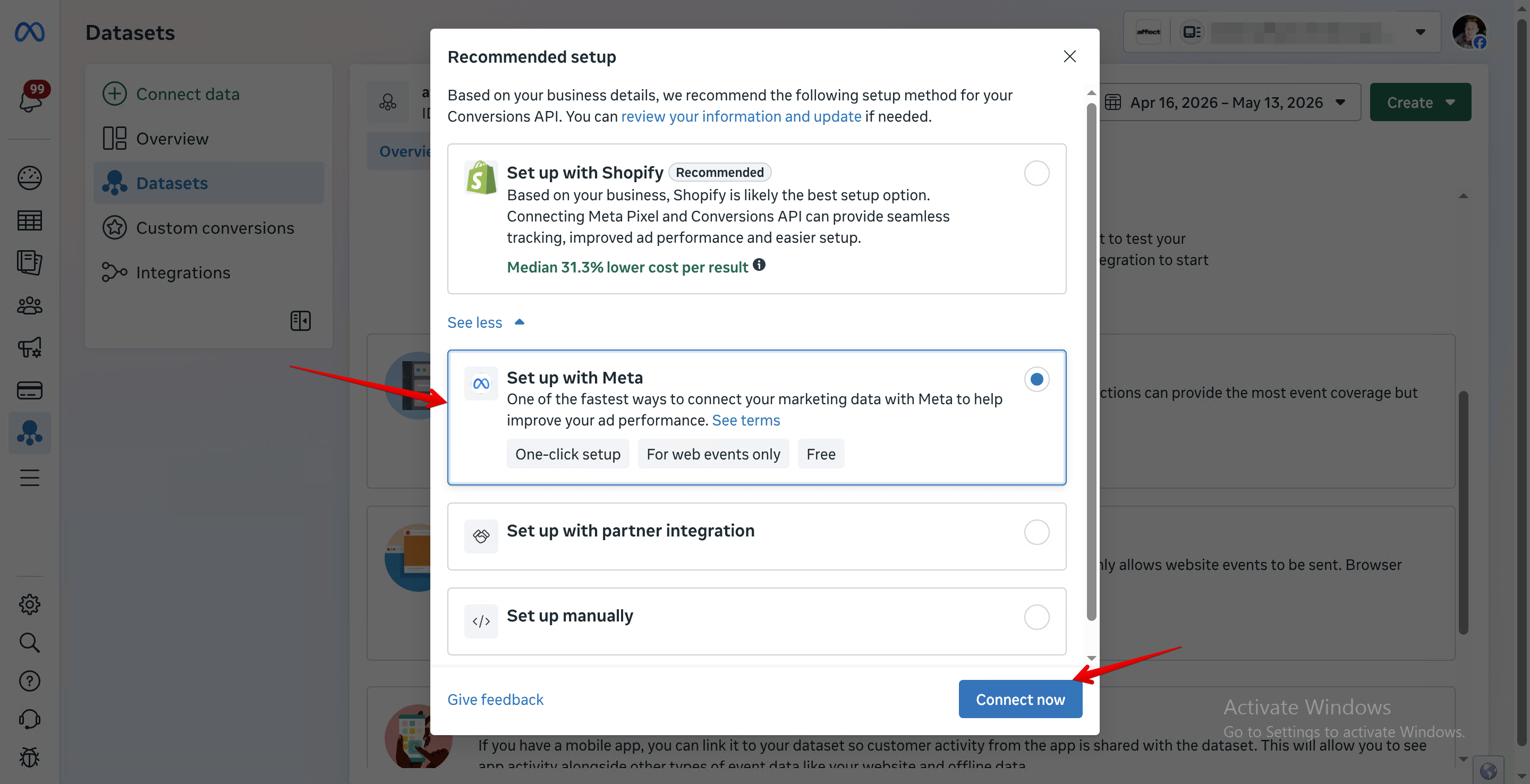
- One-click Meta-enabled CAPI. In Events Manager, on the Overview tab of a given pixel, there's now an "Activate Conversions API" button. Meta stands up the server-side itself, inherits the standard event settings from the browser pixel, and automatically sets matching
event_idvalues for deduplication. Covers: web conversions on typical platforms. Doesn't cover: offline events, custom events with unique logic, cross-channel scenarios. - Through a partner integration. Shopify, WooCommerce, and other platforms ship their own CAPI connector. Functionally similar to one-click, but sometimes tuned to the specifics of the CMS.
- Custom CAPI on your own server. When you need offline events (calls, sales out of a CRM), custom parameters, or events from multiple sources. This is developer work — Node/Python/PHP stack. Full docs: Conversions API Setup.
Step 5. Turn On Advanced Matching
Advanced Matching means sending extra user parameters (email, phone, name, IP) along with the events. As of 2026, Meta added AI enrichment: the algorithm pulls data from forms and the dataLayer on the page itself, hashes it, and attaches it to events.
In Events Manager, under Settings → Customer Information Parameters, turn on Automatic Advanced Matching and check every parameter that actually appears on your site.
Important note for the EU: if you serve a European audience, Advanced Matching should only fire after the user has given consent. More on this in the privacy section below.
Step 6. Verify Through Pixel Helper and Test Events
Two different tools, both needed:
- Meta Pixel Helper. Meta's Chrome extension. Shows which events fire from the browser and with which parameters. Helpful for spotting duplicates, missing parameters, and syntax errors. It doesn't see CAPI — server-side events bypass the browser.
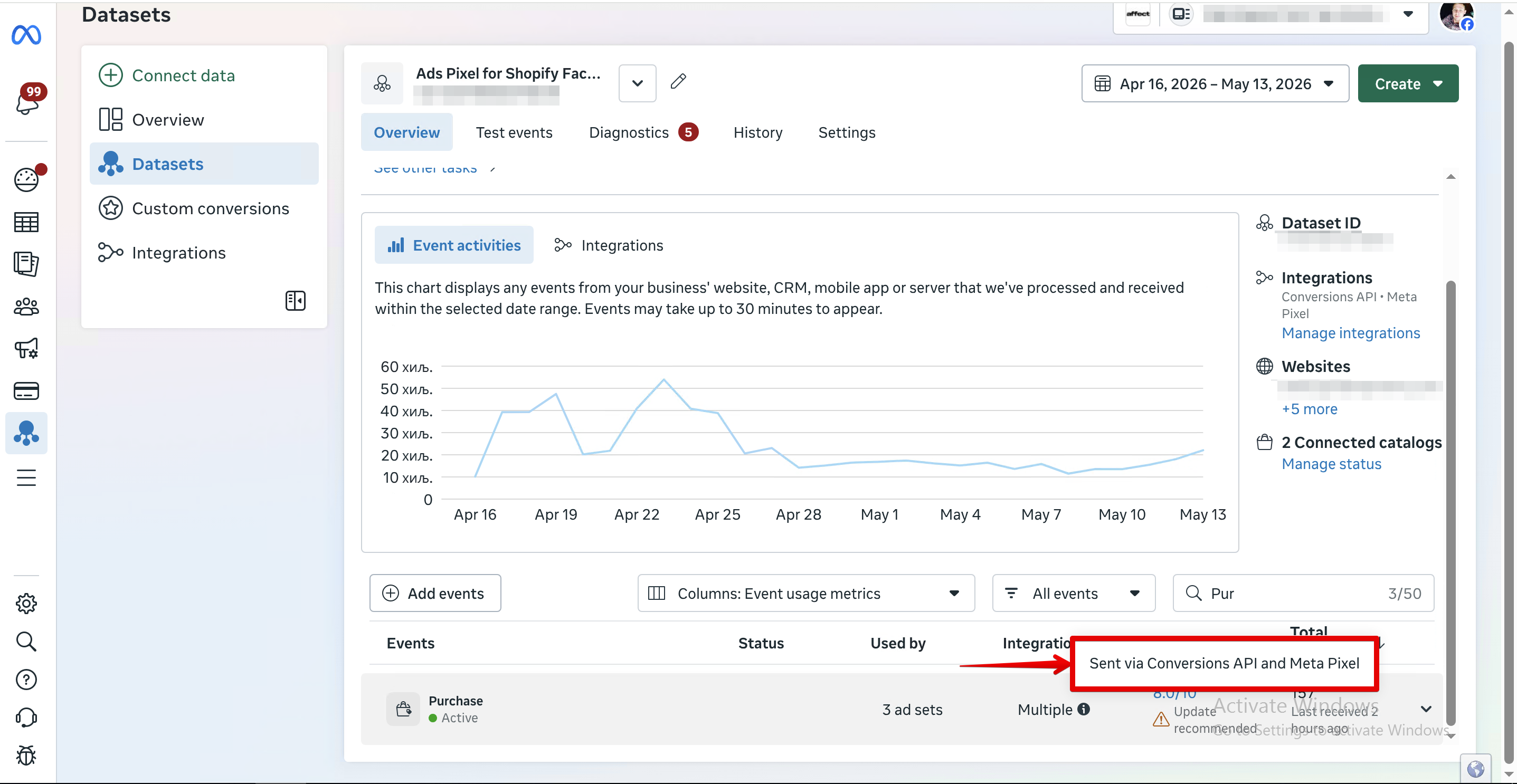
- Test Events in Events Manager. A tab inside Events Manager. Shows events from both Pixel and CAPI in real time — and, most importantly, deduplication status: it flags events where the
event_idmatched and Meta merged them into one. This is the only place where you can actually see the pair working.
Test it: open the site in incognito, walk through to the target event (a test purchase with a test promo code, for example), and watch what shows up in Test Events. You should see an event tagged Browser and a matched one tagged Server — both with the same event_id and a deduplicated status.
If Pixel Helper shows green but there's no corresponding server event next to the Pixel event in Test Events, your CAPI isn't running. Go back to Step 4.
Standard Events SMBs Actually Need
Meta's docs list 17 standard events. In practice, four or five are enough for most SMBs, and you should pick them based on the specific business scenario — not "set up all of them just in case." Extra events bloat the code and slow pixel loading, which can drag down the whole page or landing.
Which Events for Which Scenario
E-commerce (store with cart and checkout):
PageView— baseViewContent— on a product pageAddToCart— "Add to cart" clickInitiateCheckout— moved on to checkoutPurchase— paid order
All events get value, currency, content_ids, content_type parameters. On Purchase, add transaction_id for deduplication with the CRM and server-side sources.
Lead generation (request / form):
PageViewViewContent— visited a product landingLead— submitted a formCompleteRegistration— if there's a separate confirmation step (e.g., email verification)
SaaS (trial / subscription):
PageViewLead— demo request or trial signupStartTrial— user started using the trialSubscribe— paid for the subscription
One thing that matters for SaaS: the value on Subscribe shouldn't be the one-time payment — use LTV (or at minimum, the first year's revenue). Otherwise Meta will optimize for the cheapest plans, not the people who actually stick around.
Local service (booking / call):
PageViewContact— phone click or chat openedLead— request through a formSchedule— booked a specific time through a widget
AEM Priorities: Eight Events for the iOS Audience
Since 2021, Meta has used Aggregated Event Measurement (AEM) for iOS traffic. It's the constraint that came in after the ATT framework: no more than 8 prioritized events per domain, and for users who opted out of tracking, optimization runs only on the highest-priority event that occurred in the session.
iOS 14.5+ ATT hasn't gone anywhere in 2026, and iOS 26 AFP has tightened the rules on top of that. The iOS audience share varies by niche (up to 60% in luxury, 30–40% in mass-market e-commerce), but these users get counted through AEM, not the regular pixel.

The prioritization rule is simple: top slots go to the most valuable event for the business, lower ones go to supporting events. For e-commerce: Purchase → InitiateCheckout → AddToCart → ViewContent → PageView. For lead gen: Lead → CompleteRegistration → ViewContent → PageView. Anything that doesn't fit by slot 9 or below gets ignored by the algorithm on iOS traffic — pick the eight that matter most, no more.
Privacy, Consent, and the EU Reality
In 2024–2025, European regulators did what the industry had been waiting for since 2022: they pinned responsibility for the pixel on the advertiser, not on Meta.
The Site Owner Pays, Not Meta
In June 2024, the Swedish Data Protection Authority (IMY) issued the first of five Facebook Pixel decisions: a 15-million-krona fine — roughly €1.34 million — landed on the site owner. A year later, in August 2025, the Swedish regulator made a second move: fines on a pharmacy chain totaling €15 million for using Meta Pixel without proper consent.
The regulator's logic is straightforward: you installed the pixel, you're the data controller, you're on the hook for what it transmits. Responsibility for GDPR compliance sits with the site owner, not with Meta itself. The "but Meta's the one collecting it" argument doesn't hold up.
CNIL in France, Garante in Italy, and APD in Belgium have confirmed the same position from 2024 through 2026 — most default Meta Pixel configurations violate GDPR, and the responsibility lies with the site operator.
The Pixel Shouldn't Fire Before Consent
The core technical requirement is straightforward. When a visitor lands on the site, the pixel shouldn't load until the user has given consent through the banner. Not "the banner is showing and the pixel quietly collects data in the background" — that's the classic violation, and it's what gets fined. If a consent banner is up and the pixel fires before the user clicks "Accept," that's a violation.
Technically this gets done through a Consent Management Platform (CMP): Cookiebot, OneTrust, Usercentrics, Iubenda, and others. The CMP blocks the pixel and CAPI until consent is given, and it logs consents for five years (the standard GDPR requirement, in case of an audit).
40–60% of Visitors Will Decline. That's Normal.
In Germany and France, with an honestly configured consent banner, 40–60% of visitors decline ad tracking. Out of 100 hits to an EU campaign, the Pixel gets a signal from 40–60 at most. That's the real picture you need to design campaigns around, not the numbers from a 2019-era Ads Manager.
From CAPI's side, nothing changes: the server piece also shouldn't receive personal parameters without consent. But it holds up better against Safari ITP and ad blockers on the users who do give consent.
What Changes for US-Only Advertisers
If your business operates only in the US, GDPR technically doesn't apply to you. But in 2024–2026, state-level privacy laws came into force: CCPA/CPRA in California, CPA in Colorado, VCDPA in Virginia, plus Connecticut, Utah, Texas, Oregon, Delaware, Iowa, New Hampshire, and several more.
The trend points in one direction: for sensitive data (health, finance, children, precise geolocation), explicit opt-in consent is required. For the other categories, opt-out with a clear "Do Not Sell My Personal Information" button. For most US-based SMBs, that means: either you set up consent gating now, or you wait until your state lands in the next round of tightening.
If the business serves both audiences — US and EU — you'll end up living by the GDPR standard. It's stricter, and one consent architecture is simpler than two parallel ones.
Meta Pixel Audit Checklist: 11 Points
This checklist is for anyone who already has the pixel installed and now needs to know what state it's actually in. Walk through the 11 points; each one takes 5–10 minutes. Wherever something doesn't check out, go back to the setup section.
Base Install (Points 1–4)
1. One Pixel ID on the site. Open the site, fire up Meta Pixel Helper. Exactly one pixel should show up. Two or more — duplicate events and a mess in EMQ; zero — the pixel didn't load at all, often a CMP conflict or an ad blocker in the auditor's browser.
2. Base code before </head>. Open the page HTML (Ctrl+U or DevTools). The Meta Pixel snippet should sit inside <head> and before the closing tag. If it's in <body> or after other heavy analytics scripts, events from fast-bouncing visitors won't have time to fire.
3. Coverage of key events. Walk a typical user path in incognito: home → product or service → cart or form → payment or submission. At each step, Pixel Helper and Test Events should fire the corresponding standard event. If there's no Purchase on the buy and no Lead on the form, the algorithm has nothing to learn from.
4. Parameters on every event. In Test Events, open the Purchase details — you should see value, currency, content_ids, content_type. On ViewContent and AddToCart, the same set minus the transactional fields. Without parameters, the event still counts, but you won't be able to set up a ROAS campaign.
Data Quality (Points 5–8)
5. EMQ ≥ 7 on key events. Events Manager → your pixel → Overview. Under each of the core events, there's an Event Match Quality score. At 4–6, the user-level data is thin and optimization is running on half a signal; below 4, the pair needs to be reconfigured ASAP.
6. Pixel + CAPI deduplication. Test Events → run a test event. Every meaningful action should come in twice: tagged Browser (from Pixel) and Server (from CAPI), with matching event_id and a deduplicated status. If there's no server event, your CAPI isn't running.
7. Advanced Matching turned on. Settings → Customer Information Parameters. Automatic Advanced Matching set to on, core parameters (email, phone, name) checked. On a site with forms but no active AAM, EMQ rarely climbs above 5.
8. Custom Audiences are filling up. Audiences in Ads Manager → open the Custom Audiences built from Pixel events (Website Visitors, Add to Cart 30 days, and so on). Audience size should grow roughly in line with your traffic. If it's flat for two weeks, the pixel is either not sending the right events or sending them without the parameters matching is built on.
Stability and Compliance (Points 9–11)
9. CAPI sends events consistently. Events Manager → Server tab. The event curve for the last 7 days should look similar in shape to the Pixel curve. Occasional dips are normal (an instance restart); a flat zero line means the server isn't working.
10. Consent gating for EU traffic. Open the site through an EU IP (VPN), without clicking anything in the banner. Open Pixel Helper and DevTools → Network. Before "Accept" is clicked, there should be no requests to connect.facebook.net or your CAPI server. If requests are firing, that's exactly the situation that gets fined (see the privacy section above).
11. Pixel ROAS doesn't diverge from CRM by more than 20%. For the last 30 days, compare Pixel revenue (Ads Manager → Purchases Conversion Value column) against actual revenue from your CRM or billing. A 5–15% gap is normal for attribution models. 20% and up — the pixel is either losing things or counting things that didn't happen (double counting, test orders, an event firing on a thank-you page people reach without buying).
If two or more of the eleven aren't passing, your Pixel + CAPI pair isn't running at full strength. Go back to the setup and fix it down the list.
What a Clean Pixel + CAPI Setup Actually Buys You
After all of the above, the fair question is: what's it worth. The answer is four concrete results that show up 3–6 weeks after a proper setup.
Andromeda and GEM Work Better
Pixel and CAPI feed the retrieval stage (Andromeda) and the ranking stage (GEM) of Meta's ad delivery system. The higher the EMQ and the steadier the server stream, the more accurately the algorithm decides who to show your ads to and which auctions to compete in. Across our portfolio at Affect, moving from Pixel-only to a deduplicated pair with EMQ 7+ delivers a +10–25% ROAS lift over a six-week window — without changing the creative or the budget.
Custom and Lookalike Audiences Get Better
Custom Audiences fill up only with users the pixel can identify. On Pixel-only, that averages 40–50% of real traffic; on Pixel + CAPI, it's 70–85%. Lookalikes built on those seeds get better too: a cleaner seed means similar users who are closer to real buyers.
A caveat for the EU: Lookalikes inside the EU have been more constrained since 2024 (after DMA tightening), and parts of Meta's lookalike tooling aren't available there. That's a separate architectural story, but the core "cleaner data → more accurate audiences" principle still holds wherever Lookalikes are available.
Reports You Can Bring to Leadership
The gap between Pixel-Reported Purchases and actual CRM revenue is the classic 2024–2025 pain: "Ads Manager is showing us $1.2M, but $800K is in the bank — who do we believe?" On a CAPI + deduplication setup, that gap collapses to 5–15%, and the conversation with a CFO or an investor has something to lean on besides "Meta says so."
Resilience to the Next Platform Shift
Pixel-only is a bet that browser tracking will keep working the way it did in 2020. The last three years say otherwise: iOS 14.5, iOS 17, iOS 26, Safari ITP, Chrome Privacy Sandbox, Manifest V3, DMA. Every next change cuts at the browser side.
The server stream through CAPI is indifferent to those changes: it doesn't depend on cookies, doesn't get blocked by ad blockers, doesn't suffer from ITP.
Meta Pixel Isn't the Goal. The Signal Is.
Most articles on pixel setup are written as if installing the thing is the result. In 2026, that doesn't work.
The pixel is part of the infrastructure Meta's algorithm uses to understand what's happening in your business. On its own, the pixel hands over a picture that's missing 30–60% of real events. Paired with Conversions API, with proper deduplication, with EMQ ≥ 7 and working consent gating, it hands over a picture the algorithm can actually act on. The difference between those two configurations is the difference between "running ads" and "getting results from ads."
If you've walked the checklist above and found that half the points aren't passing — that's a fine starting point. It's two to three weeks of work between a developer and a marketer, no site rewrite, no platform migration.
If there's no developer and no marketer on hand, and no team to pull it together — that's the space we work in at Affect, with e-commerce and lead-gen clients on a permanent basis. Setting up Pixel + CAPI, auditing EMQ and deduplication, is part of our Paid Social Media service. We can stand it up from scratch or audit and fix what's already there.
Either way — walk the checklist and see where your setup is right now. Every next dollar you put into Meta Ads depends on it.
Related articles

Meta Ads Marketing Targeting: Interests, Martech, and Business Tools 2026

Understanding Meta Ads Video Metrics: How to Measure, Analyze, and Improve Performance

Maximize Reach of Ads in Meta Ads: When the Reach Objective Works for Awareness Goals on Facebook and Instagram