Google Merchant Center Introduces UCP Integration Hub for Agentic Checkout
On October 6, 2026, Google began a phased rollout of UCP Integration Hub in Merchant Center. The new section is designed to connect online stores to purchases through AI Mode in Google Search and Gemini.
The main change is that merchants get a single interface for configuring Universal Commerce Protocol, verifying the technical integration, and managing the available order checkout scenarios through Google's AI assistants.
Previously, connecting to Universal Commerce Protocol required working mainly with technical documentation and separate APIs. Now a significant part of the setup and testing moves directly into Merchant Center.
The new interface covers three areas:
- Transfer to Merchant Cart: transferring a cart built in Google to the online store.
- Native Checkout on Google: completing a purchase directly in the Google interface.
- Identity Linking: linking the shopper's account to an existing store account for personalized checkout.
At launch, UCP Integration Hub was available to a limited group of U.S. merchants. Google has planned to expand access to Canada and Australia in 2027.
UCP Integration Hub: A Single Interface for Connecting AI Sales
Setting Up Agentic Checkout Directly in Merchant Center
In October 2026, Google added a new section, Settings → UCP Integration, for participants in the early access program.
It brings together tools for connecting the store, verifying protocol capabilities, and preparing to launch sales.
The section includes two main tabs.
Overview contains tools for technical setup, testing, and checking integration readiness.
Analytics provides reporting on purchases and user interactions with supported UCP scenarios.
As a result, Merchant Center becomes not only a source of product data for Google Shopping but also an interface for managing connections to new AI sales channels.
At the same time, the new section does not remove the requirements for server-side integration. To work with UCP, the store must support the corresponding APIs and correctly pass information about products, orders, and payment.
Transfer to Merchant Cart: Transferring the Shopper's Cart to the Online Store
The first UCP scenario allows the shopper to select products in Google and then continue checkout directly in the online store.
For example, a user asks Gemini to pick out equipment for a home office.
The AI assistant recommends several suitable products, after which the shopper adds the chosen product to the cart.
When Transfer to Merchant Cart is used, Google passes the cart contents to the online store.
The shopper lands on the merchant's website, where they can review the order and complete the purchase through the familiar checkout.
To do this, the store must implement the UCP Cart API.
The integration transfers information about the selected products, their quantities, and the cart state.
The main advantage of this option is that the existing checkout process is preserved.
The store does not need to fully move its own checkout logic into the Google interface.
For companies that use non-standard checkout scenarios, additional customer verification, or their own payment systems, this option may be simpler for initial implementation.
However, Transfer to Merchant Cart is not a full Native Checkout.
The shopper still leaves the Google interface to complete the transaction.
Native Checkout: Purchasing Directly in Google AI Mode and Gemini
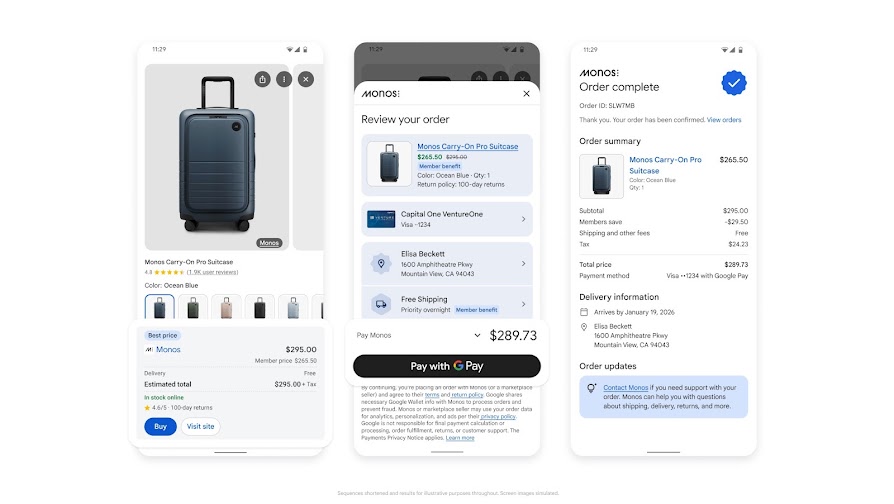
The second scenario provides for checkout without going to the merchant's website.
The user can select a product in AI Mode or Gemini and click the Buy now button.
Google then displays the checkout interface.
The shopper reviews the order, selects a shipping address, and confirms the payment.
Payment is made with Google Pay using supported payment credentials saved in Google Wallet.
Google does not become the seller of the product.
The online store remains the Merchant of Record, responsible for the sale, order fulfillment, returns, and interaction with the shopper.
Google provides the shopping interface and handles the interaction between the AI service, the commerce system, and the payment infrastructure.
To support Native Checkout, the store must implement three main REST operations:
Create Checkout. Creating a new checkout session.
Update Checkout. Updating the parameters of an existing session, such as the shipping address, shipping cost, or taxes.
Complete Checkout. Confirming and completing the transaction.
In addition, the store must send Google information about order statuses after the purchase.
For example, the merchant must report changes in order status, product shipment, and other supported events in the purchase lifecycle.
A separate UCP Order Lifecycle system with server-side notifications is used for this.
Identity Linking: Connecting Shopper Accounts and Loyalty Programs
The third capability of UCP Integration Hub is Identity Linking.
It is designed to link a Google account with an existing shopper account in the online store.
For example, a user regularly buys products from a particular retailer and participates in its loyalty program.
After the account is linked, the store will potentially be able to take the shopper's personal terms into account during checkout through the AI interface.
This may include authorized purchases and applying available loyalty program benefits.
The technical foundation of Identity Linking is OAuth 2.0.
The store needs to implement the corresponding authorization methods and declare support for Identity Linking in its own UCP Profile.
Feature status: in the Integration Hub documentation, Identity Linking is marked as Coming Soon. Therefore, it cannot be considered a universally available capability as of the October launch.
For the initial connection, most merchants should focus primarily on Transfer to Merchant Cart or Native Checkout.
How to Connect UCP Integration Hub
Stage One: Preparing Merchant Center and Getting Access
In October 2026, Google began granting access to UCP Integration Hub gradually.
The program is initially aimed at merchants operating in the U.S. market.
The store must have an active Merchant Center account and meet Google's requirements for merchants and product offers.
Participation requires registration through the official interest form.
The process is as follows:
- Prepare product data and store information.
- Review the UCP technical requirements.
- Implement the required integration option.
- Apply to participate in the program.
- Wait for Google to confirm access.
- After the connection, open Merchant Center → Settings → UCP Integration.
It is important to keep in mind that submitting an application does not mean access is granted automatically.
Google selects program participants and opens the connection interface gradually.
If UCP Integration Hub is not present in the account, the store can study the technical documentation and prepare the integration through the Direct API.
However, Google's approval is still required for a commercial launch.
Stage Two: Choosing the Checkout Method
After getting access, open Settings → UCP Integration.
The Overview tab displays the technical preparation stages.
Before testing begins, you need to determine which capabilities the store plans to support.
Transfer to Merchant Cart suits companies that want to keep checkout on their own website.
Native Checkout on Google suits merchants that are ready to support checkout through server-side APIs directly in the Google interface.
A store can implement both scenarios.
In that case, each selected capability must pass a technical review.
Identity Linking is treated as an additional feature and requires a separate OAuth 2.0 implementation.
Stage Three: Preparing the UCP Profile
UCP uses a special file in which the online store describes its supported capabilities and the technical parameters of the integration.
This file is called the Merchant UCP Profile.
It must be hosted on the store's own domain at:
https://example.com/.well-known/ucp
The profile specifies the supported capabilities, available APIs, and other parameters required for Google to interact with the commerce system.
For example, if the store has implemented Native Checkout, the corresponding capability must be listed in the UCP Profile.
If support for the Cart API is declared, the profile must correctly reflect this scenario as well.
When verifying the integration, Google accesses the UCP Profile and compares the declared capabilities with the actual behavior of the API.
Therefore, the list of features in the profile must match the selected Merchant Center configuration.
Stage Four: Setting Up the API and Access Keys
For testing and subsequent operation, you need to set up authorized Google access to the store's API.
Google recommends using separate keys for the test and production environments.
This makes it possible to test checkout scenarios without touching live transactions.
In Integration Hub, you need to specify the location of the UCP Profile and prepare the corresponding credentials.
API key testing and the use of a Bearer Token in the applicable cases are supported.
For security, it is important to limit key permissions and not use one configuration for all environments.
Production keys must be transferred through a secure channel agreed upon with Google.
Sandbox: Testing the Cart and Checkout Before Launch
Testing the Cart API Without Real Purchases
One of the key advantages of UCP Integration Hub is built-in testing of the technical integration.
The Overview section includes the step Test your UCP implementation in a sandbox environment.
For Transfer to Merchant Cart, you can test the main cart operations.
Create Cart tests cart creation.
Get Cart retrieves the current state of the cart, if the corresponding method is implemented.
Update Cart is used to test changes, such as product quantities.
Cancel Cart tests ending work with the cart or canceling it.
This way, the developer can make sure that Google interacts correctly with the commerce platform before the feature is enabled for shoppers.
For example, when transferring a cart with two variants of the same product, you need to check that the store correctly identifies the SKU, the quantity, and the current price.
Testing Native Checkout in the Test Environment
Separate tests are provided for Native Checkout.
In particular, Integration Hub can simulate creating a checkout session, changing order parameters, and completing a purchase.
Test operations help check how the system responds to changes in the shipping address, the shipping cost, and order processing errors.
For example, if the shopper enters an address that the store does not serve, the API must return the corresponding error.
Google will be able to show it to the shopper and suggest correcting the address if the error falls into the recoverable category.
Correct handling of the final cost is especially important.
If the user changes the shipping region, the store must recalculate the available shipping methods, taxes, and other mandatory charges.
The data shown to the shopper must match the amount of the transaction being confirmed.
Validating the Production Integration Before Launch
After successful tests in the Sandbox, the production environment must pass validation.
For this, UCP Integration Hub prompts you to select the supported capabilities and confirm the location of the UCP Profile.
Google then checks the technical implementation.
For Transfer to Merchant Cart, the main focus is on account setup and the correctness of the cart transfer.
For Native Checkout, the operations for creating, updating, and completing a checkout session are also checked.
You also need to set up the transfer of order statuses and accept the terms of the UCP program.
After the technical checklist is completed, the integration is sent to Google for review.
Completing the tests does not mean sales launch automatically. Google makes the decision to enable the functionality.
Product Feed Requirements for Native Checkout
The checkout_eligibility Attribute: Which Products Can Be Sold Through Google
To support purchases directly in Google, you need to separately mark the products available for Native Checkout.
Google's documentation provides the attribute:
native_commerce(checkout_eligibility)
It determines whether a specific product can participate in the new checkout scenario.
If the value is TRUE, the product is marked as eligible for Native Checkout, provided the other program requirements are met.
If the value is FALSE or missing, the product does not become available for this type of purchase.
The default value is FALSE.
This allows merchants to manage Native Checkout availability at the level of individual products.
For example, a store can first enable the new channel for standard products with simple ordering and shipping logic.
Products that require complex personalization or additional checks can be left without Native Checkout support.
Google recommends using an additional product data source, a Supplemental Feed, to pass UCP participation parameters separately from the main product feed.
At the same time, activating the attribute does not guarantee that the Buy now button will appear.
This requires merchant approval, a correct technical integration, and meeting Google's other requirements.
Information on Shipping, Returns, and Mandatory Warnings
For Native Checkout, it is especially important that Google receives accurate information about the terms of purchase.
In Merchant Center, you need to check:
- Product prices and availability.
- Correctness of product and variant identifiers.
- Shipping methods and costs.
- Return policies.
- Store contact information.
- Legally required warnings for certain product categories.
For example, for products subject to special consumer disclosure requirements, Google may require additional warnings.
This information is used not only for product recommendations.
It is necessary for processing the transaction correctly and fulfilling the merchant's legal obligations.
If the feed data does not match the information in the commerce system, the shopper may face a change in the final cost or be unable to complete the order.
Therefore, before connecting UCP, you need to check the consistency of Merchant Center, the catalog management system, and the Checkout API.
Different Requirements for Native Checkout and Cart Transfer
It is important to keep in mind that Google separates the two integration options by technical complexity.
Native Checkout requires support for a full checkout process inside Google, including up-to-date product information, terms of sale, and integration with the payment system.
For Cart Transfer, part of the review is simplified, since the actual transaction is completed on the store's website.
Therefore, merchants should not consider all Native Checkout requirements mandatory for the simpler cart transfer scenario.
However, for both options, product identifiers must be correctly matched between Merchant Center and the commerce system.
Payments, Customer Data, and Merchant Responsibility
Google Pay Is Used for Payment, but the Online Store Remains the Seller
When Native Checkout is used, the shopper can pay for the product with Google Pay.
For this, Google interacts with the merchant's supported payment provider.
The store does not have to add a Google Pay button to its own website just to participate in UCP.
However, the payment provider used must support the corresponding processing of payment tokens, and the merchant must meet the applicable Google Pay & Wallet requirements.
Google does not take on the role of Merchant of Record.
The merchant retains responsibility for the sale, taxation, order fulfillment, customer support, and returns.
The terms of purchase are set by the merchant and must be available to the shopper during checkout.
Thus, UCP provides an additional shopping interface but does not replace the company's commerce infrastructure.
Purchases Through UCP and Customer Data
Since the merchant continues to process the order, transaction information is passed to its commerce system.
This makes it possible to record purchases in the store's own order database and perform standard post-sale operations.
At the same time, the processing of personal data must comply with applicable privacy and user consent rules.
Google notes that the merchant retains the relationship with the customer, but this does not mean automatic permission to use the contacts received for any marketing communications.
For example, using a shopper's email for mailings must comply with applicable consent rules and the store's own policies.
Identity Linking will later be able to expand the capabilities for authorized purchases and loyalty programs, but as of the October launch, this feature was not yet generally available.
UCP Analytics: Measuring Purchases Through AI Mode and Gemini
Separate Analytics for Cart Transfer and Native Checkout
UCP Integration Hub includes an Analytics tab.
It is designed to analyze shopper interactions with the two main UCP scenarios.
For Transfer to Merchant Cart, Google shows metrics related to transferring the cart to the store's website.
For Native Checkout, data on shopper actions directly inside Google is available.
This separation is necessary because the analytics model differs from a regular purchase after a click from Google Shopping.
With Cart Transfer, the user lands on the store's website and can continue checkout in a standard web session.
With Native Checkout, the order can be created without visiting the website.
Consequently, standard browser-based analytics does not necessarily capture all shopper actions.
Transfer to Merchant Cart Metrics
The following metrics are provided for the cart transfer scenario:
Cart Transfers. The number of instances in which Google transferred a cart to the online store.
Average Cart Value. The average value of a transferred cart.
Average Product Count. The average number of products in a cart.
Average Product Value. The average value of an individual product.
These metrics make it possible to assess shopper interest in the store's offers in Google's AI channels.
However, Google states directly that after the cart is transferred to the website, it cannot track all subsequent shopper actions within this integration.
Therefore, to assess final sales, Cart Transfers need to be matched against orders in Shopify, another commerce system, or the company's analytics database.
Native Checkout Metrics
For purchases directly inside Google, more complete transaction information is available.
In particular, the following are provided:
Buy Button Clicks. The number of clicks on the purchase button.
Purchase Count. The number of completed orders.
Average Order Value. The average order value.
Average Product Count. The average number of products in an order.
Average Product Value. The average product value.
Cancellations. The number of canceled orders.
These metrics make it possible to analyze the performance of the built-in checkout without having to reconstruct the entire purchase process from web sessions.
Separately, Merchant Center can show the products that sell best through UCP.
For online stores, this is especially important when assessing which product categories receive demand in AI search.
How to Use UCP Analytics Together with GA4 and Advertising Analytics
For Performance Marketing, it is fundamentally important to distinguish between the source of an order and the way it is checked out.
If the shopper completes the transaction directly in Google, the order may be absent from the website's usual sequence of events.
Therefore, the purchase cannot be evaluated solely on the basis of GA4 data or browser tags.
The order management system should remain the main source of information about the commercial result.
UCP Analytics data should be used to analyze the additional shopping funnel.
When building overall reporting, orders need to be matched by unique identifiers, and double counting of transactions must be avoided.
In addition, UCP Analytics metrics should not be automatically equated with Google Ads advertising attribution.
A purchase through AI Mode or Gemini does not by itself prove that the order was obtained thanks to a paid ad placement.
To calculate ROAS and other advertising KPIs, you need to use the actual data from advertising campaigns and the appropriate attribution methodology.
How UCP Integration Hub Is Useful for E-commerce Companies
Selling Products Directly in AI Search
The main advantage of UCP is the appearance of an additional purchase scenario.
The user can start with a question to an AI assistant, get recommendations, and complete the transaction without going to the online store.
This potentially reduces the number of steps between choosing a product and paying.
However, Google does not publish universal data proving an increase in conversion for all UCP participants.
Therefore, the effect needs to be assessed based on actual orders.
Using the Existing Merchant Center Product Feed
UCP relies on the existing Google Shopping and Merchant Center infrastructure.
The merchant continues to manage product data, prices, availability, and other offer attributes.
At the same time, additional requirements appear for supporting checkout, the cart, and the store's technical profile.
For companies with a well-configured product infrastructure, this creates an opportunity to expand sales channels without building a separate catalog specifically for Gemini.
Choosing Between a Simplified and a Full Integration
UCP Integration Hub allows you to choose the connection method based on the capabilities of the commerce system.
A company that is not ready to move checkout to Google can start with Cart Transfer.
A store with the necessary APIs, payment infrastructure, and order processing capabilities can prepare Native Checkout.
This reduces the need to apply the same integration model to all merchants.
Keeping Control Over Orders
An important difference between UCP and marketplaces that act as the seller themselves is that the Merchant of Record role stays with the online store.
The company continues to manage orders, shipping, returns, and customer service.
At the same time, Google provides a new interface for interacting with the shopper.
What to Check Before Connecting
For an E-commerce company, preparing for UCP should cover four areas.
Merchant Center. You need to check the quality of the product feed, prices, availability, return policies, shipping settings, and legal information.
Commerce platform. You should determine whether the existing system supports the Cart API or full Native Checkout operations.
Payments and orders. For Native Checkout, you need to prepare the payment integration, the transfer of order statuses, and correct error handling.
Analytics. You need to provide for separate measurement of orders through UCP and for matching them against the overall transaction database.
If the store uses a third-party E-commerce platform, such as Shopify, BigCommerce, or another system, you need to check that platform's own plans for UCP support.
Having a store on a popular platform does not yet mean automatic readiness for the new Google integration.
UCP Integration Hub Availability
In October 2026, UCP Integration Hub began gradually opening to participants in the early access program in the U.S.
Google announced plans to expand coverage to Canada and Australia in 2027.
At the time of the announcement, the connection was not a generally available Merchant Center feature.
Merchants need to meet the technical requirements and get Google's approval.
Identity Linking was marked as a future capability.
Support for individual UCP features also depends on the stage of the protocol's development and the selected integration method.
Therefore, companies should check the current status of capabilities in the documentation and in their own Merchant Center.
What the Update Means for Online Stores
Google Merchant Center UCP Integration Hub is a new tool for connecting merchants to Agentic Commerce through Google AI Mode and Gemini.
It combines configuring Universal Commerce Protocol capabilities, API verification, testing shopping scenarios, and analytics reporting.
For online stores, the main change is the appearance of two ways to complete purchases from AI conversations: transferring the cart to the store's own website and completing the order directly in Google.
At the same time, the merchant retains control over product data and responsibility for the transaction.
The update is most relevant for E-commerce companies that already work with Google Merchant Center and view AI search as an additional sales channel.
The practical priority is preparing product data, choosing the appropriate integration method, and setting up analytics that make it possible to track sales through the new AI interfaces separately.
Sources
- Google Merchant Center Help: How to Onboard to the UCP Integration Hub
- Google for Developers: About UCP Integration Hub in Merchant Center
- Google for Developers: How to Start UCP Integration in Merchant Center
- Google for Developers: Prepare Your Merchant Center Account
- Google for Developers: UCP Integration Overview
- Google for Developers: Monitor and Optimize Your UCP Integration
- Google Merchant Center Help: About UCP and UCP-Powered Checkout
- Google for Developers: UCP Frequently Asked Questions
- Search Engine Land: Google Rolls Out Merchant Center UCP Integration Hub in the U.S., October 6, 2026
- Search Engine Roundtable: Google Merchant Center New UCP Integration Hub, October 7, 2026
Related articles

Google Floodlight to Recover Cross-Device Conversions Using Signed-In Data

Google DV360 Introduces Gemini-Curated Marketplace and LinkedIn CTV Inventory

TikTok Announces Agentic Leads and Smart+ Automation for Search Ads

TikTok Q4 2026 Updates: GMV Max Pro, Search Metrics, and Smart+ Creatives

X Launches Lead Gen Ads for All Advertisers With Native Forms and CRM Integration

Microsoft Advertising Expands Performance Max Controls, Reporting, and AI Campaign Tools

Bloomreach Adds External Segments, Custom Item Types and Data Hub Contexts

Pinterest Opens Programmatic Deals for DV360, Amazon Ads, and Yahoo DSP

Reddit Ads and HubSpot CRM Integration: Lead and Deal Attribution