Webflow Campaigns Introduces AI Agents for ABM Landing Pages, Ad Creation and CRM-Connected Measurement
On October 20, 2026, Webflow launched Campaigns, a standalone product for creating and managing marketing campaigns using AI agents. The platform combines brand design system extraction, marketing brief preparation, landing page generation, personalization for audiences and target accounts, ad creative generation, Google Ads activation, and conversion analytics. Campaigns is designed for performance marketers, demand generation professionals, and B2B teams that need to launch campaigns independently without constantly involving designers and web developers.
Webflow first introduced the product on September 3 at Webflow Conf 2026, and it became available for purchase on October 20. Unlike the standard Webflow Designer, Campaigns organizes work around a marketing campaign rather than an individual web page. AI agents use a shared design system and campaign brief to align ads, landing pages, and personalized page variations with the same messaging concept. Campaigns can also be used independently of a company's main website, even if that website runs on WordPress or another CMS.
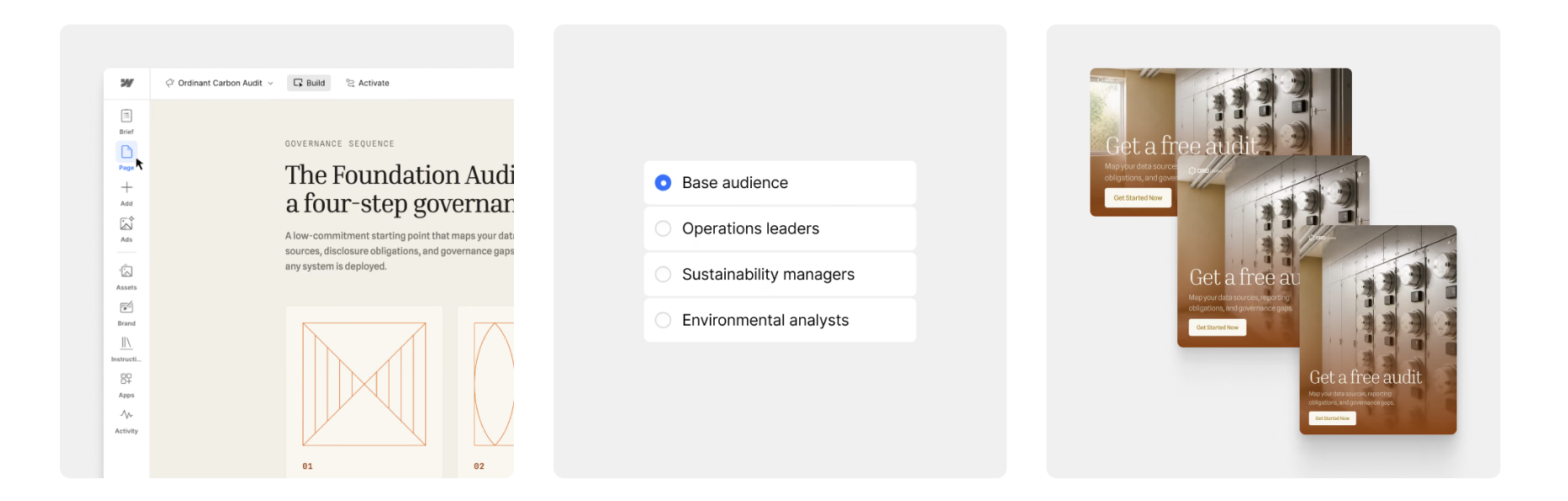
Brand System: Automatically Extracting a Company's Design System
The first step in Webflow Campaigns is creating a Brand System, a unified design system used to generate all subsequent marketing materials. Instead of manually transferring brand colors, fonts, and components into a separate builder, marketers provide the URL of the company's existing website. Webflow analyzes its visual elements and creates a reusable set of brand settings.
The system extracts the color palette, typography, logos, and distinctive interface elements. These parameters provide the foundation for designing landing pages and ad images. AI generation is therefore based on the company's actual brand identity rather than generic templates that require manual customization.
The design system is created in Campaign Hub. During initial setup, users open Campaigns in the Webflow dashboard, select Create hub, enter a workspace name and the URL of an existing website, and then select Import brand. After extraction, users can review colors, replace logos, edit fonts, and repeat the import if necessary. The approved design system is used for subsequent campaigns in that Hub.
An important limitation is that the imported design system must be reviewed before generation begins. Webflow allows users to adjust the extracted parameters, but importing a website alone does not guarantee accurate reproduction of every brand requirement, including custom components, responsive design characteristics, and internal guidelines for using brand graphics.
Campaign Brief: An AI Agent Defines the Marketing Campaign Structure
The next step is preparing a Campaign Brief, which defines promotional objectives, target audiences, the advertising offer, and key messages. Previously, marketers typically had to prepare separate design specifications, landing page requirements, and ad creative briefs. Campaigns combines these materials into a single source document used to generate pages and ads.
Users describe the task in natural language and can attach a marketing brief, presentation, or reference document. AI uses the supplied materials to prepare a structured brief that must be reviewed and approved before page creation. It can include target audiences, the offer, the desired conversion action, the tone of communication, and constraints related to markets, deadlines, or legal requirements.
| Campaign Type | Purpose |
|---|---|
| Lead gen | Collecting inquiries and prospective customer contact information |
| Gated content | Generating leads through access to restricted content |
| Meetup | Promoting meetups and small events |
| Webinar | Registering webinar attendees |
| Product feature | Promoting product features and capabilities |
These options help AI determine the initial page structure but do not replace the brief itself. Marketers can refine the page content, add product specifications, customer testimonials, quantitative evidence, and conversion requirements. If a campaign type is not selected, Campaigns can determine it automatically.
Landing Page Generation: Creating Landing Pages From a Brief
After the brief is approved, AI creates an editable landing page using the saved design system and specified marketing concept. The system generates the page structure, copy, section layout, and visual design. The resulting page can be modified in the Webflow editor without manually writing HTML or CSS.
Marketers can rewrite copy, replace images, rearrange sections, add new blocks, and adjust the design. Both conventional visual editing and interaction with AI Assistant through text instructions are available. For example, users can request changes to the main headline, revise the benefits section, or adapt the page to a particular offer.
The generated page is not published automatically. Webflow provides a review stage during which users must verify the accuracy of all facts, images, and wording. If the original brief lacks sufficient detail, AI may leave temporary placeholders for missing information, such as statistics or evidence of product effectiveness.
Team members with the Reviewer role can be invited to approve the completed page. Once the review is complete, the landing page is published to a staging domain or a connected custom domain through Webflow's standard publishing process.
From a practical perspective, Campaigns reduces the number of transitions between content preparation, design, and publication. However, responsibility for the accuracy of offers, legal wording, product specifications, and advertising claims remains with the marketing team.
Personalization: Landing Pages for Personas, Industries, and Target Accounts
One of the key capabilities of Campaigns is creating multiple personalized landing page variations from a single template. Instead of developing separate landing pages for every audience, marketers can retain the overall structure and design while changing only the elements that need to reflect the interests of a particular segment.
Webflow supports personalization for buyer personas, industries, individual companies, and search queries. For example, a B2B SaaS company can prepare a single base product page and then create variations for financial services, retail, and enterprise IT teams. Each version can use relevant headlines, benefit descriptions, images, and selling points while retaining shared design elements.
Page Variations can be generated based on the audiences described in the original brief. Webflow automatically suggests these audiences in the Page panel, where users can create variations individually or select Generate all. Users can also manually add an audience with its name, description, and personalized above-the-fold content.
Managing Personalized Content
The system allows users to edit copy and images directly on the page or through a shared personalized content table. In this table, each variation is represented by a separate row, and customizable elements are represented by fields that can be edited without opening each landing page individually.
Changes to the shared template apply to elements that have not been personalized. If a particular segment has its own headline or image, that value is preserved independently of the base version's content. This allows marketers to maintain a consistent design while delivering individual messages to different audiences.
Each variation has its own URL and publishing status. Creating the base landing page does not automatically publish all its variations: marketers must review and publish the required versions. This approach is particularly useful in ABM programs, where companies on a target account list need dedicated pages with relevant offers.
ABM and Keyword-Based Personalization
For account-based marketing, Campaigns allows marketers to prepare a page for a specific company or group of companies while retaining the original design and adapting the commercial message. For example, a landing page targeting a large retailer may emphasize ecommerce integrations, while a version for a SaaS company may focus on attribution, lead quality, and CRM.
The same principle applies to search queries. Marketers can create page variations that more closely match specific search intent and direct relevant advertising traffic to them. However, having different URLs does not imply automatic visitor identification or dynamic page replacement. The documented workflow creates separate page variations to which the appropriate audiences must be directed.
Ad Creative Generation: Ad Images Based on Campaign Design and Messaging
Campaigns includes a dedicated tool for generating ad images associated with prepared landing pages. This allows marketers to work not only on the visual appearance of an ad but also on aligning its messaging with the landing page content. For performance marketing, this connection is particularly important when testing offers for different audiences.
The documented creative generation workflow requires a Reference Image, which serves as the visual foundation for the future ad. Users can also upload up to four Supporting Assets, such as a product image, an interface screenshot, or a speaker's photograph. The main file can be up to 30 MB, while each supporting file can be up to 10 MB. JPEG, PNG, and WebP are supported.
The workflow begins in Build → Ads. After uploading the reference image, users select Generate first ad and receive the initial ad image within a Creative Set. They can modify it through text prompts, adjusting the CTA, colors, images, logos, or design elements. Other sizes should be generated only after the base version has been approved, because subsequent changes to the base image are not automatically applied to previously generated formats.
Generating Ad Formats
| Format | Dimensions | Applications |
|---|---|---|
| Horizontal 1.91:1 | 1200 × 628 | Google Ads, LinkedIn, Meta |
| Landscape 16:9 | 1200 × 675 | Reddit, Meta Feed |
| Square 1:1 | 1200 × 1200 | Google Ads, LinkedIn, Meta, Reddit |
| Vertical 4:5 | 1080 × 1350 | Facebook and Instagram Feed, LinkedIn |
| Portrait 3:4 | 1080 × 1440 | Organic Instagram posts |
| Story 9:16 | 1080 × 1920 | Meta Stories and Reels |
The ability to generate an image of the required size does not mean that it automatically meets all platform advertising requirements. For example, Google Search may reject images containing text overlays and logos, while some 6sense formats require nonstandard dimensions that Campaigns does not generate.
Personalized Ad Creatives
Campaigns can create separate ad image variations for the audiences specified in the brief. After generating the base creative, the system suggests creating Ad Variations tailored to different segments. Users can select specific supporting images for each variation and generate the required dimensions.
As a result, marketers receive several connected asset sets: a personalized landing page, a corresponding ad creative, and a collection of images for placement. Campaigns also supports multiple Creative Sets within a single campaign, allowing marketers to compare different visual approaches without rebuilding landing pages.
At launch, direct ad publishing is supported only through Google Ads. Images for Meta, LinkedIn, Reddit, and other platforms can be downloaded, but uploading and launching them must be handled separately through the respective advertising platforms.
Google Ads Integration: Launching Performance Max From Campaigns
After creating pages and advertising materials, Webflow allows users to proceed with setting up a Google Ads campaign. The integration uses the Google Ads for Webflow app, connected to Campaign Hub through the Activate tab. At launch, the supported workflow was limited to creating Performance Max campaigns rather than arbitrary Google Ads campaign types.
Before advertising can begin, users must connect Google Ads and publish the base page along with all personalized variations intended for use in advertising. Campaigns then helps create Performance Max asset groups, transfer images, and associate advertising materials with the corresponding landing page URLs.
Each selected page variation becomes a separate Asset Group in Google Ads. The Final URL points to the corresponding personalized landing page, while the ad images come from the prepared Creative Sets. Headlines, long headlines, and descriptions are generated by Google rather than Webflow, which is important to consider when reviewing advertising materials.
Which Settings Remain in Google Ads
The integration does not fully replace the Google Ads interface. After transferring the materials, advertisers continue campaign setup directly in Google Ads, selecting conversion goals, budgets, geographic and language targeting, URL parameters, and campaign dates.
Campaigns therefore primarily automates the preparation of landing pages and images and their association with asset groups. Advertising strategy configuration, budget control, and compliance with advertising policies remain part of the standard Google Ads launch process.
Forms & CRM: Lead Capture and Data Transfer to Marketing Systems
Campaigns supports connecting HubSpot and Marketo forms to landing pages. This allows companies to use their existing marketing workflows without creating a separate lead processing mechanism for each new landing page. Forms can be added as components that automatically inherit styles from Brand System or embedded through an iframe.
When form fields are modified in HubSpot or Marketo, Webflow allows users to update the corresponding component on the page. This reduces the need to manually maintain identical forms across multiple personalized landing pages. To track submissions correctly, the relevant tracking feature must be enabled separately, and the page must be republished.
Webflow also allows the use of native forms from its own website builder. However, native Webflow form submissions are not currently counted as conversions in Campaigns Analytics and must be reviewed in the site settings. Supported HubSpot or Marketo integrations should be used for comprehensive lead analytics within Campaigns.
Connecting CRM and Measuring Sales Impact
In addition to forms, Campaigns supports CRM integrations with HubSpot and Salesforce. These integrations connect the initial conversion action with subsequent changes in the sales funnel. For example, marketers can track whether an inquiry from a specific landing page variation became a sales opportunity and how much potential revenue is associated with the campaign.
Salesforce and HubSpot can be connected through the Integrations section in Campaign Hub. Webflow imports standard CRM objects used for opportunity reporting. Marketo supports a workflow linking form submissions to Salesforce data, but the comprehensive synchronization of audiences, Smart Lists, and form goals available in Webflow Optimize is not supported in Campaigns.
This distinction is important when evaluating the product: Campaigns connects landing page conversions with CRM data but does not replace the entire marketing attribution infrastructure. Pipeline impact reporting depends on data completeness, correct CRM associations, and tracking configuration.
Campaign Analytics: Measuring Traffic, Conversions, and Pipeline
Webflow Campaigns includes its own reporting system, which consolidates the results of individual landing pages and campaigns within Campaign Hub. Unlike a conventional page builder, the product allows marketers not only to publish marketing materials but also to monitor their performance after launch.
| Metric | What It Measures |
|---|---|
| Sessions | Number of visits to campaign pages |
| Unique Visitors | Number of unique visitors |
| Conversions | Form submissions and other supported conversions |
| Accounts Engaged | Number of companies that submitted a form and were matched to CRM records |
| Pipeline | Sales opportunities associated with campaigns through CRM |
Campaigns also provides analysis at the individual campaign level, allowing marketers to compare traffic and conversions across different landing pages. A connected CRM extends reporting beyond the initial interaction and helps evaluate the campaign's contribution to sales opportunities.
Tracking Configuration and User Consent Requirements
Tracking in Webflow Campaigns is disabled by default. To collect statistics, users must open Campaign Hub settings, navigate to Tracking, and enable tracking. Published pages must be republished after changing this setting; otherwise, the new parameters will not take effect.
Webflow offers three tracking options: continuous data collection, tracking with an opt-out option, and tracking disabled by default until user consent is obtained. The appropriate mode depends on legal requirements and the company's privacy policy. Options involving visitor consent or opt-out require a corresponding consent management solution.
Pipeline and engaged account reporting also require a CRM connection. Without this integration, Campaigns can display basic traffic metrics and supported conversions but cannot fully associate collected leads with sales opportunities.
AI Recommendations: Suggestions for Improving Campaigns
After launch, Campaigns uses collected data to generate recommendations for further landing page improvements. Webflow describes this capability as Agent Recommendations: AI helps identify changes that marketers should consider during subsequent stages of campaign development.
Instead of ending the process after publication, marketers can return to existing pages, modify offers, edit copy, and create additional personalized variations. This connects campaign creation with subsequent optimization, allowing traffic acquisition and conversion results to serve as input for future iterations.
However, Webflow does not claim that Campaigns independently conducts comprehensive statistical A/B tests or automatically reallocates advertising budgets based on the results. AI recommendations should be regarded as a tool supporting marketers rather than a proven system for autonomous advertising performance optimization.
Webflow MCP: Managing Campaigns Through External AI Agents
Campaigns also supports integration with Webflow MCP Server, making some product capabilities available through compatible AI tools, including Claude and ChatGPT. Instead of editing pages sequentially through the interface, users can describe the required actions in natural language and pass them to a connected agent.
Through MCP, users can create campaigns from an approved brief, modify page copy and images, manage components, create personalized variations, and analyze results. In particular, the integration supports updating content across multiple page variations simultaneously, with up to 30 variations in a single operation. Available analytics operations include reviewing trends in sessions, users, and page views, as well as the number of form submissions, engaged accounts, and open and successfully closed sales opportunities from CRM.
The integration has limitations. MCP does not currently support extracting a brand design system or creating and managing ads, and some publishing operations must be performed directly in Campaigns. Editing the brief through MCP also does not automatically regenerate or publish pages.
Webflow Campaigns Availability and Product Limitations
Since October 20, 2026, Campaigns has been offered as a standalone commercial Webflow product. Using it does not require migrating a company's main website to Webflow, because landing pages can operate independently and use their own domain. Each Campaign Hub supports one design system and one domain, so separate workspaces can be created for different brands or business units.
Generating pages, personalized content, and ad images consumes Webflow AI Credits. Consequently, when creating dozens or hundreds of personalized landing pages at scale, teams must consider both the cost of accessing Campaigns and AI credit consumption. Webflow does not specify a single fixed generation cost for every campaign type in the documentation reviewed.
The main limitations of the initial release concern advertising integrations and analytics. Direct publishing is available for Google Ads Performance Max, while other platforms require manual creative export. Sales data depends on CRM integrations, and using native Webflow forms does not provide comprehensive conversion tracking within Campaigns.
About Webflow Campaigns: it is a standalone Webflow AI platform for preparing, publishing, and analyzing personalized marketing campaigns. It brings together brand assets, landing pages, ad images, Google Ads, and CRM reporting within a single workflow. For B2B teams, performance marketers, and agencies, the product is particularly relevant as a tool for accelerating campaign production and scaling personalized advertising offers without constantly relying on web development resources.
Sources
- Webflow: Your Next Campaign Starts Here. Meet Webflow Campaigns, October 20, 2026
- Webflow: Introducing Webflow Campaigns
- Webflow Help Center: Get Started with Campaigns
- Webflow Help Center: Create Campaign Page Variations
- Webflow Help Center: Create Ads in Campaigns
- Webflow Help Center: Launch Google Ads from Campaigns
- Webflow Help Center: Connect a CRM to Your Campaign
- Webflow Help Center: Manage Campaigns with the Webflow MCP Server