
How to Analyze Performance Max by Channel: Search, Display, and YouTube
Introduction
Unlike Search campaigns, analyzing Performance Max is not just about identifying which audience signals and which creatives perform best. Performance Max results can depend directly on where your ads are delivered and how impressions are split between Search, Display, and video inventory. That distribution shapes your average conversion rate, and the efficiency of each environment often depends on the type of content you provide: text assets for Search, and images and video for Display and YouTube.
Table of contents
Key changes in 2026
Over the last year, Google made several meaningful steps toward better Performance Max transparency, making analysis deeper and more actionable. Key improvements include the launch of the Channel performance report (introduced in April 2025 and rolled out across accounts in November 2025), the expansion of Where ads showed reporting experience in late 2025, and broader API capabilities that make it easier to extract more detailed information and build dashboards.
Channel Performance report
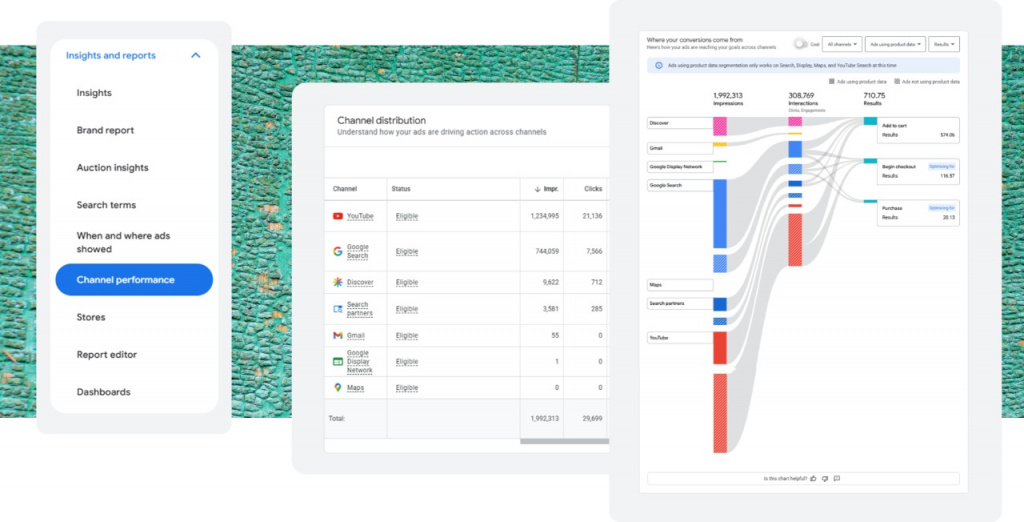
Channel Performance is your main entry point to performance by inventory type: Search (Google and partners), Discovery, Display Network, Gmail, and YouTube. This report lets you see how Performance Max splits delivery between channels, and how that split maps to traffic and conversions. Google Blog Google Business
What matters most is that you are not only looking at impressions. You can evaluate cost (to understand the true price of each channel), as well as conversions and conversion value (so this is about performance, not just delivery). Alongside export-ready tables, the report also provides an interactive dashboard with visuals that make trends easier to interpret.
Previously, we often explained performance changes through assets and targeting alone. Now we can connect changes in outcomes to changes in the channel mix. You can also monitor what actually drives spend growth when you raise daily budgets. And by tracking each channel over time, you can test whether higher buying volume delivers a delayed or compounding impact on campaign performance.
Do not be surprised if some channels are missing in your report. If a channel is absent, confirm that your campaign includes the assets required to serve there (for example, a Product Feed or Video). Also verify that certain placements are not restricted at the account level under Tools and Content suitability.
Where ads showed
Where ads showed is an older reporting area, but it also changed over the past year. Beyond devices, time, and geography, the “Where ads showed” section now helps you understand distribution not only by channel, but also by specific placements. Here you can see actual YouTube channels, websites, and mobile apps.
As with Channel Performance, if you do not see certain placement types (for example, mobile apps), confirm that your Content suitability settings and your Performance Max assets allow delivery in those environments.
Report Editor
All parameters available in Channel Performance and Where ads showed are also available in the Report Editor. However, many of them remain incompatible with certain metrics and dimensions, so you may not be able to build every combination you want. Still, meaningful customization is available. Google Help
Channel Performance in the Google Ads API v23
In January 2026, Google announced additional Performance Max analysis capabilities through the Google Ads API v23. This means deeper data does not have to live outside your normal environment. You can keep your analysis in Looker dashboards or internal tools, including workflows that use GPT, Gemini, or other analytics layers. Ads Dev Blog
Most importantly, this is about ad_network_type in v23 returning real channel values rather than “mixed” values. That allows stronger channel-level analysis and supports combinations with ad_using_video and ad_using_product_data, helping you draw conclusions about which content types drive results in different environments. Google Developers