
Meta Pixel: How On-Device Conversion Measurement Works
On November 12, 2026, Meta began rolling out Measure conversions on customer devices. It is a new way to measure purchases by matching a conversion to an ad interaction directly on the customer’s device.
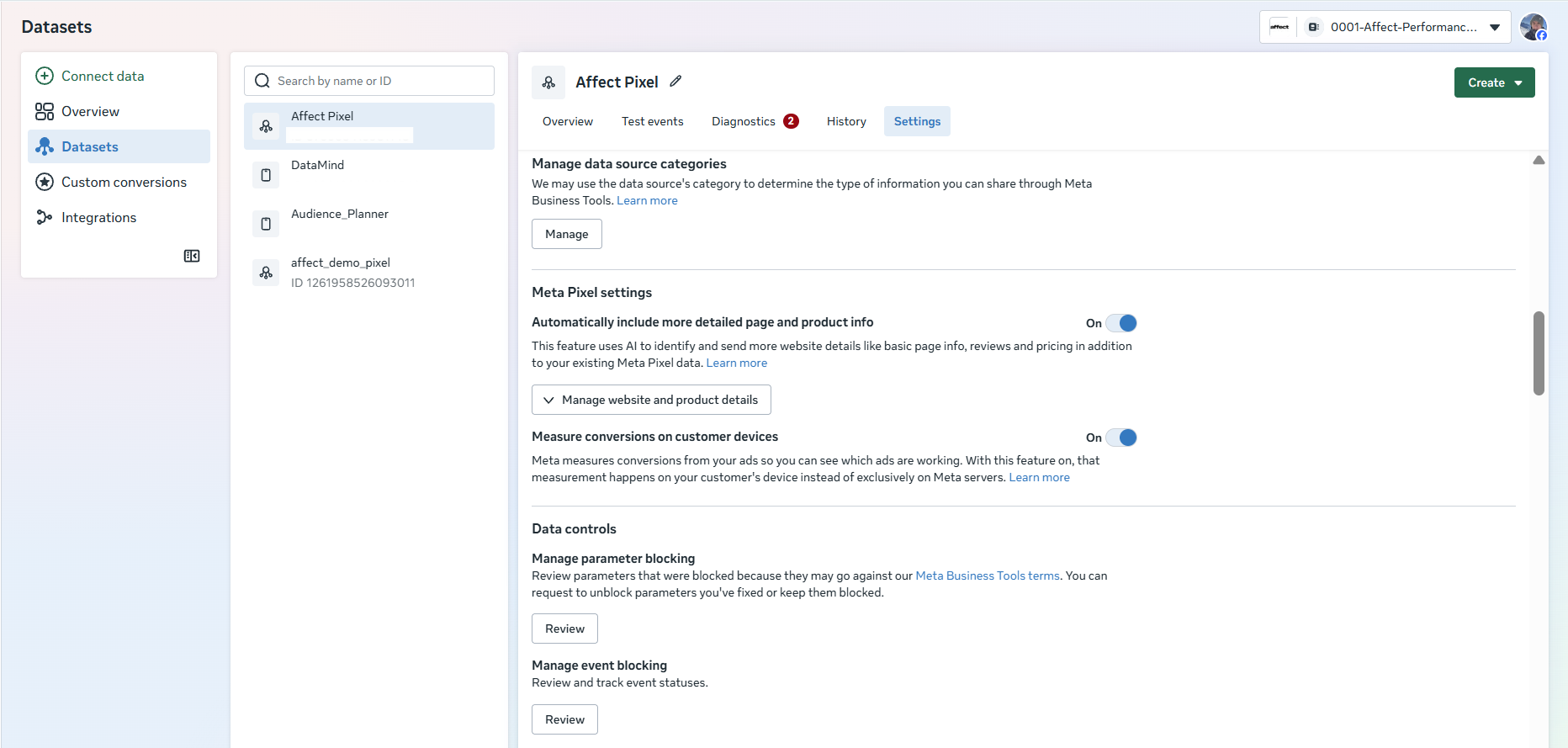
The feature turns on automatically for eligible Meta Pixels. It is designed to improve measurement of purchases that Meta previously could not connect to Facebook or Instagram ads. Advertisers can manage the setting in Events Manager.
What Changed in Conversion Measurement
Before the update, Meta used data from Meta Pixel and the Conversions API to match website purchases to ad interactions. Receiving a Purchase event alone does not guarantee that Meta can identify which ad the customer interacted with. The event can be recorded without a link to an ad impression or click.
For example, a customer visits an online store after seeing an Instagram ad, browses products, and leaves without buying. A few days later, they return directly, sign in with their email address, and place an order. The store records the purchase and Meta Pixel sends the Purchase event, but Meta may be unable to connect it to the earlier ad interaction.
Measure conversions on customer devices adds another way to match these events. In addition to server-side matching, Meta can match a purchase on the customer’s device. This can give ads credit for purchases the store had already recorded but Meta had not attributed to an ad campaign.
The existing attribution model and attribution windows still apply. The change affects whether Meta can identify a connection between an ad and a purchase under those rules.
How Measure Conversions on Customer Devices Works
The new method uses information the customer provided to the advertiser, such as an email address or phone number. It also uses temporary device data that Meta describes as non-identifying. These signals help determine whether a purchase occurred after an interaction with a Meta ad. The match happens on the customer’s device, and Meta’s ad system can use the resulting measurement.
A Simplified View of On-Device Measurement
- Ad interaction. A customer sees an ad on Facebook or Instagram.
- Website purchase. Meta Pixel records a Purchase event.
- On-device matching. Meta has another way to connect the purchase to the ad interaction.
- Attributed conversion. Ads Manager counts the purchase if it meets the attribution rules.
Meta Pixel continues to record website events and send the configured data to Meta’s advertising systems. On-device matching adds to existing measurement methods.
Matching on the device is one operation within the broader conversion measurement system. Other processes may still handle customer information elsewhere. Meta has not published the full sequence for handling identifiers or explained in detail how local and server-side matching work together.
What Advertisers Need to Do
Most eligible setups require no additional installation. Meta enables the feature automatically, and the existing Meta Pixel continues to record events.
The pixel must be installed directly on the website, and the advertiser needs a way to collect customer information, such as an email address or phone number at sign-in. A server-only setup using the Conversions API does not meet the requirements on its own.
How to Check the Setting in Events Manager
- Open Meta Events Manager.
- In Data Sources, select the relevant Meta Pixel.
- Open the Settings tab.
- Find Measure conversions on customer devices.
- Check the toggle. If the setting is available and on, you can turn it off if needed.
The feature is on by default for eligible data sources. If the business uses multiple pixels, check the setting for each one. The toggle can be on while only eligible purchases are measured on the customer’s device.
Do You Need to Change Meta Pixel or the Conversions API?
Meta does not require new code for eligible pixels. Advertisers can keep using their existing purchase events and campaign settings.
If a business uses Meta Pixel and the Conversions API together, deduplication must continue to work correctly. For example, when the browser and server both send a purchase, both copies must use matching event_name and event_id values. This helps Meta count the two submissions as one event.
Deduplication, accurate Purchase events, and consent requirements still matter when on-device measurement is enabled. Check that the existing conversion setup works correctly before assessing the new feature.
Where On-Device Measurement Is Available
The initial rollout covers eligible users outside the European Union and the United Kingdom. Eligibility depends on where the user is located. For example, a US online store can sell to customers in Germany and France, but on-device measurement will not apply to those European customers.
For international advertisers, the change can affect attribution differently by region. If a business runs campaigns in both the US and the EU, comparisons after November 12 should account for the fact that the update may affect only some geographic segments.
How the Update Can Affect Purchases, CPA, and ROAS
Ads Manager may attribute more purchases to ad campaigns. The change can bring previously unattributed Purchase events into reporting while the store’s order count stays the same. The table shows how that can affect individual metrics.
| Metric | Possible change |
|---|---|
| Purchases | More purchases attributed to ads |
| Cost per Purchase / CPA | Lower reported cost per purchase |
| Purchase Conversion Value | Higher attributed purchase value |
| Purchase ROAS | Possible increase |
| Actual order count | No direct change from the measurement update |
For example, an advertiser spent $10,000 and Meta attributed 200 purchases, yielding a cost per purchase of $50. If the new method connects 20 more orders that were already placed to ads, Ads Manager would report 220 purchases and the CPA would fall to $45.45. Actual store orders and ad spend could stay the same. This hypothetical example illustrates how attribution affects reported metrics.
How to Evaluate Changes in Results
The main risk for advertisers is how they interpret changes after the feature goes live. If Ads Manager reports more Purchases while Shopify or the CRM records the same number of orders, Meta may be matching more of those purchases to ads.
Compare the results with independent business data, including actual orders, revenue, and other store metrics. Record the date the feature was enabled and track trends in eligible regions separately. This can help determine whether changes in ad metrics reflect sales activity or the updated measurement method.
Meta has not confirmed separately how on-device measurement affects bidding algorithms or campaign optimization. An increase in attributed purchases alone is insufficient to establish that the quality of signals used for optimization has improved.
What Meta Pixel Measures on a Website
Meta Pixel is a browser-based tool that records website events and sends them to Meta’s ad system. It can record page visits, additions to cart, registrations, purchases, and other actions to measure Facebook and Instagram ad performance.
Meta Pixel works with the Conversions API, which sends events from website servers, CRMs, and other business systems. Together they help Meta connect ad interactions with subsequent actions on the website.
Measure conversions on customer devices adds a way to match ad interactions to purchases and improve attribution coverage. Actual sales are counted by the business. Ads Manager reporting may become more complete, so advertisers should take care when comparing CPA and ROAS before and after the rollout.
Sources
- Meta Business Help Center, On-device Conversion Measurement, official Meta documentation
- Stape, Meta On-device Conversion Measurement, October 22, 2026, how it works, limitations, and Pixel and CAPI requirements
- PPC Land, Meta Pixel Counts More Sales from November 12, October 28, 2026, rollout timing and measurement changes
- Jon Loomer Digital, Measure Conversions on Customer Devices, an overview of the setting
- Performance Marketing News, Meta Pixel Measures Conversions on Customer Devices, geography, requirements, and setup
- MetricMaven, Measure Conversions on Customer Devices, checking the setting in Events Manager