Google Ads Demand Gen Updates: Display Targeting Controls, API v26.2 and View-Through Attribution Changes
In October and November 2026, Google introduced several Demand Gen changes affecting ad channel management, creative automation, bidding algorithms, and conversion measurement. Starting the week of December 1, control over Display inventory will move entirely to the ad group level. Google Ads API v26.2 adds seasonality adjustments for Demand Gen and automated text overlays on videos. At the same time, Google is revising the criterion used to determine which Display ad impressions count toward view-through conversion attribution.
The changes have different implications. Display settings determine where ads appear, the new API features expand campaign management options, and the revision to view-through attribution affects how reports are interpreted even when ad settings remain unchanged.
Display Controls Move to the Ad Group Level
On November 9, 2026, Google announced that it would change the rules for managing Display inventory in Demand Gen campaigns through the Google Ads API starting the week of December 1. Previously, Display had two levels of control: the campaign setting network_settings.target_content_network and Channel controls at the ad group level. If Display was disabled at the campaign level, that setting took precedence over ad group settings.
After the update, the decision to use Display will be determined exclusively by the settings of the relevant ad group. The network_settings.target_content_network field will default to true for new Demand Gen campaigns, but this does not mean Display will automatically be enabled in all ad groups. Actual placements will depend on the selected channel strategy and ad group settings.
What Will Happen to Existing Campaigns
Google has provided for automatic conversion of existing settings. If Display was previously disabled at the campaign level, Google will change the value of the relevant field and move the restrictions to the ad group settings. The goal of the conversion is to preserve actual campaign behavior without enabling additional inventory. The update should therefore not, by itself, expand existing campaigns' reach to the Display Network.
However, advertisers using the Google Ads API, their own integrations, or external automation tools need to update their channel management logic. Once the new rules take effect, attempts to set network_settings.target_content_network = false when creating or editing a Demand Gen campaign will result in an OPERATION_NOT_PERMITTED_FOR_CONTEXT error. Instead, advertisers need to use demand_gen_ad_group_settings.channel_controls at the ad group level.
How to Check and Change Display Targeting
In Google Ads, Channel controls allow advertisers to manage placements separately for each Demand Gen ad group. In the interface, advertisers can either automatically use all available channels or select individual placements. Individual selection includes YouTube, Discover, Gmail, Google Maps, and the Google Display Network. To exclude third-party Display inventory, advertisers need to leave the Google Display Network disabled while retaining the Google-owned placements they want.
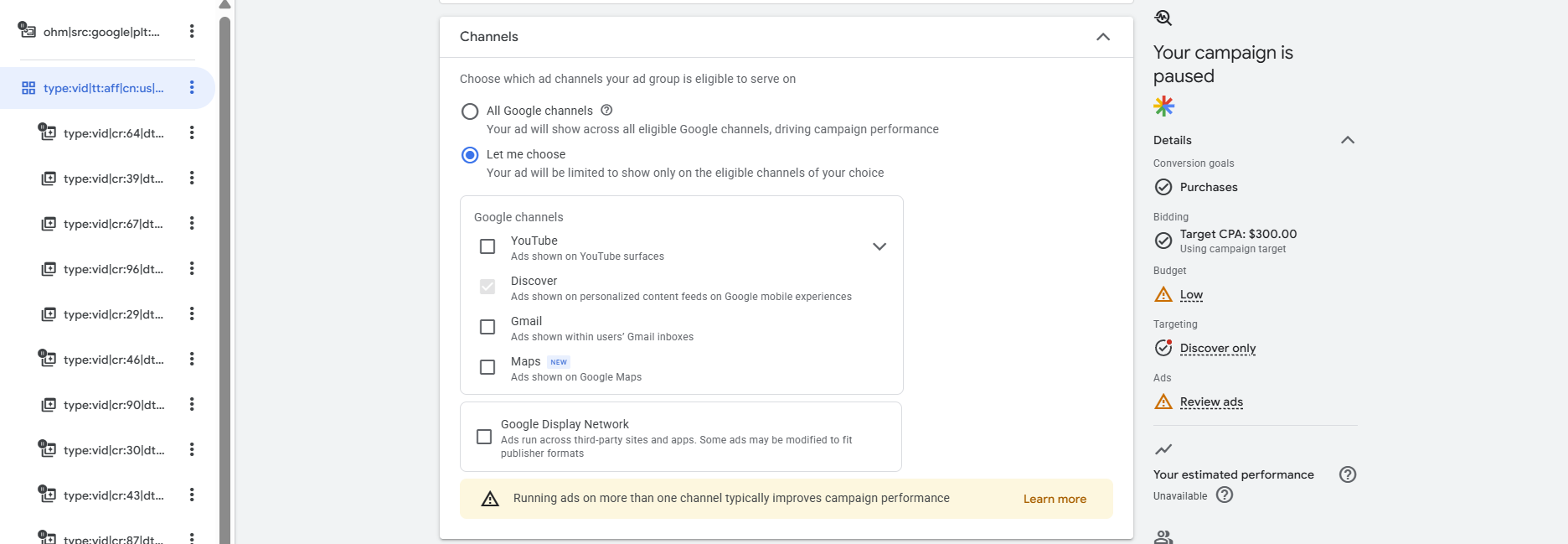
For integrations through the Google Ads API, the relevant parameter is ad_group.demand_gen_ad_group_settings.channel_controls.selected_channels.display. Setting it to false disables this channel in individual selection mode.
Developers need to consider not only the value of display but also the selected channel strategy. For example, the ALL_CHANNELS strategy uses all available placements, while ALL_OWNED_AND_OPERATED_CHANNELS excludes third-party Display inventory. The Google Ads API allows developers to retrieve channel settings by querying the ad_group resource, including the current strategy and individual placement flags.
Google Ads API v26.2: Seasonality Adjustments and Video Automation
On November 11, 2026, Google released Google Ads API v26.2. This is a minor update with no announced breaking changes. For Demand Gen, it introduces two features related to bid management and video creatives. The release also expands reporting and authorization error handling capabilities.
Seasonality Adjustments for Demand Gen
The Google Ads API now offers beta support for the BiddingSeasonalityAdjustment resource for Demand Gen campaigns. Seasonality adjustments allow advertisers to inform Smart Bidding of an expected short-term change in conversion rate.
For example, an online store plans a sale during which the proportion of website visitors who make a purchase typically increases significantly. A seasonality adjustment allows the advertiser to communicate the expected increase in conversion rate to the algorithm for a specific period. This is not a manual bid increase by a specified percentage. The adjustment informs Smart Bidding of an expected change in conversion rate, which the algorithm takes into account when setting bids.
Google recommends using these settings only for significant, short-term changes in conversion rates. Smart Bidding accounts for normal seasonal fluctuations automatically. For Demand Gen, API support is in beta and has limitations on where it can be applied. In particular, it does not extend to Discover inventory.
Automated Text Overlays on Videos
The second feature is AssetAutomationType.OVERLAY_TEXT_ON_VIDEOS. It allows Google to automatically use ad text assets as overlays on videos in Demand Gen Video Responsive Ads. For example, an advertiser uploads a video and several headlines. The system can create a creative variation in which one of the headlines appears directly on the video.
For new Demand Gen video responsive ads created through API v26, this automation defaults to OPTED_IN. This matters for advertisers with strict visual design requirements: a text overlay can alter the original composition of the video or conflict with an approved design.
When creating video ads through the API, advertisers need to check asset automation settings and the resulting creative variations, especially if they use preproduced videos containing text, logos, and legal notices. The update does not require advertisers to enable the new setting for existing ads.
Additional Google Ads API v26.2 Changes
In addition to the Demand Gen features, the release includes two general-purpose updates. Unique Users: the unique_users metric expands unique reach analysis at the customer level, including breakdowns by ad format and network. This allows integrations to retrieve additional reach data from the Google Ads API.
Multi-party Authorization: new error codes have been added for procedures that require confirmation of sensitive operations. They allow applications to handle situations more accurately when an action requires additional approval.
These changes do not require configuration by advertisers who use only the Google Ads web interface. They are primarily intended for developers of analytics systems and tools for programmatic ad management.
Display View-Through Attribution: A New Ad View Criterion
On October 5, 2026, a change to the rules for counting view-through conversions for Display inventory within Demand Gen became known. Google is moving from the Active View standard to the definition of a rendered ad impression.
Previously, for a Display ad impression to meet the Active View standard, at least 50% of the ad area had to be visible for at least one continuous second. The new criterion is considerably less restrictive: it requires only one pixel of the ad to appear on screen for any amount of time.
The previous criterion was Active View: at least 50% of the ad area for one second. The new criterion is a rendered impression: at least one pixel of the ad on screen for any amount of time. The change applies to Demand Gen Display inventory. Advertisers do not need to take any action to transition to the new methodology.
A view-through conversion is recorded when a user sees an ad, does not interact with it, but later converts within the specified attribution window. Lowering the visibility threshold increases the number of ad impressions eligible for this attribution. As a result, the number of view-through conversions may increase even if spending, audiences, and the actual number of purchases remain unchanged.
The change does not mean that every impression will automatically become a conversion. The user still needs to complete a target action, and Google must associate it with an ad impression within the attribution window. However, the pool of potentially eligible impressions becomes larger.
How the Change Affects Demand Gen Evaluation
For advertisers evaluating Demand Gen by view-through conversions, the October update creates a break in the comparability of historical data. For example, if a campaign previously recorded 300 view-through conversions per month and began recording 450 after the metric's definition changed, this does not necessarily mean that performance improved by 50%. Part of the increase may be explained entirely by Google's inclusion of a wider range of ad impressions.
- View-through conversions and their trends.
- Conversions following ad clicks and interactions.
- Actual purchases and leads in the advertiser's analytics systems.
- Spending, reach, and the distribution of impressions across ad channels.
It is especially important to account for attribution changes when comparing Demand Gen with Search, Shopping, and Performance Max. These products differ in their ad interactions and measurement rules.
View-Through Attribution and View-Through Conversion Optimized Bidding Are Different Mechanisms
The change in the ad view criterion should not be confused with the separate View-through Conversion Optimized Bidding feature. The former determines which impressions are eligible to count toward view-through conversions. The latter allows the corresponding conversion signals to be used for bid optimization in Demand Gen.
Google is developing view-through conversion optimization primarily for video creatives. The change to Display attribution should therefore not be interpreted as automatically switching all Demand Gen campaigns to a new bidding strategy. Optimization settings and reporting rules need to be considered separately.
What Demand Gen Advertisers Need to Check
The November updates affect three independent areas of campaign management. Display targeting: check which ad groups use Display and make sure the selected strategy matches the media plan. Google Ads API: update integrations that use campaign-level Display targeting.
Video automation: check automated text overlay settings for new video ads. Seasonality adjustments: consider using them for short-term promotions with a significant expected change in conversion rate. View-through attribution: account for the change in methodology when analyzing conversions and comparing historical periods.
Automated tools that create and edit Demand Gen campaigns through the API require separate checks. After Display controls move to the ad group level, requests using the old parameter may no longer execute.
For advertisers who work exclusively in the Google Ads web interface, the most important steps are checking the distribution of inventory and correctly interpreting view-through conversions. The API changes do not require them to perform a technical migration themselves.
Demand Gen Expands Automation While Preserving Channel Control
Demand Gen is a Google Ads campaign type designed to generate demand through visual formats on YouTube, Discover, Gmail, Google Maps, and the Google Display Network. The October and November 2026 updates develop two areas of the product: automation of ad creatives and bidding algorithms, and more precise channel management at the ad group level.
Moving Display controls eliminates the conflict between campaign and ad group settings. The Google Ads API v26.2 features expand opportunities for video ad automation and accounting for short-term changes in conversion rates.
However, the revision to view-through attribution requires caution when evaluating results. Expanding the range of eligible ad impressions can increase the number of attributed conversions without a comparable change in actual sales. For advertisers, the most important distinction is between three tasks: managing placement channels, optimizing campaigns, and independently evaluating their business results.
Sources
- Google Ads Developer Blog: Display targeting changes in Demand Gen, November 9, 2026
- Google Ads API: Demand Gen Channel Controls
- Google Ads Help: Channel controls in Demand Gen campaigns
- Google Ads API: v26.2 Release Notes, November 11, 2026
- Google Ads API: Create Seasonality Adjustments
- Search Engine Land: Demand Gen Display View-Through Attribution, October 5, 2026
- Google Ads Help: View-through Conversion Optimized Bidding for Demand Gen